LoadLibrary - a small insight
Ever wondered what LoadLibraryA / LoadLibraryW really does?
I reversed the function and discovered its true behavior. The function itself is quite abstract and high-level. When you reverse it, for example using IDA Pro or Ghidra, you will find that the function actually calls LdrLoadDll, which is the next layer. LdrLoadDll is an undocumented Windows function intended for internal use only. It's not meant to be used by regular developers.
If we dig deeper by reversing LdrLoadDll, we eventually get to LdrpLoadDll, which is yet another lower-level function. Continuing this process leads us to LdrpLoadDllInternal, the lowest layer of this mechanism. Interestingly, even at this level, it's still possible to load a DLL using C or C++.
LoadLibrary
LoadLibrary is the standard method for loading DLLs on Windows. It's well-documented and very easy to use. For more information, you can refer to the MSDN documentation. Below is a simple example where we call the LoadLibrary function:
bool myLoadLibrary(const wchar_t* name)
{
    if (!name)
        return false;
    HMODULE lib = LoadLibraryW(name);
    if (!lib)
        return false;
    FreeLibrary(lib);
    return true;
}
LdrLoadDll
LdrLoadDll is a lesser-known function. It is defined in ntdll.dll and also exported by it. If we want to use this function, we first need to create a typedef for it, as it is not officially supported. Being an undocumented function, it is intended for internal use only and is not meant for regular developers.
However, there are still people who have reversed the function and shared their findings. You can find more information here. I have also implemented this function. Since it is undocumented, it's a bit more challenging to call.

bool myLdrLoadDll(const wchar_t* name)
{
    if (!name)
        return false;
    //Get func
    auto Proc = reinterpret_cast<tLdrLoadDll*>(GetProcAddress(GetModuleHandleW(L"ntdll.dll"), "LdrLoadDll"));
    if (!Proc)
        return false;
    //call it
    HANDLE lib = nullptr;
    //Get RtlInitUnicodeString
    auto Rtl = reinterpret_cast<tRtlInitUnicodeString*>(GetProcAddress(GetModuleHandleW(L"ntdll.dll"), "RtlInitUnicodeString"));
    if (!Rtl)
        return false;
    UNICODE_STRING str;
    Rtl(&str, name);
    NTSTATUS stat = Proc(nullptr, 0, &str, &lib);
    if (NT_SUCCESS(stat))
    {
        FreeLibrary(static_cast<HMODULE>(lib));
        return true;
    }
    return false;
}
LdrpLoadDll
LdrpLoadDll is another layer down. It is not exported by ntdll.dll, so calling it is a bit more difficult. First, we need to obtain the exact address of LdrpLoadDll in ntdll.dll. I have two methods in mind to achieve this.
The first method is to calculate the address using an offset. However, this approach is not very reliable, because if ntdll.dll is updated, we would need to update the offset as well.
A more reliable method is pattern scanning. Although pattern scanning is harder to implement and a bit slower since we have to brute-force the address, it is more consistent. Essentially, we have to iterate over every byte in ntdll.dll. The advantage of this method is that we don't need to update the pattern after every update—only if the pattern itself changes, which typically happens when the function is modified.
bool myLdrpLoadDll(const wchar_t* name)
{
    if (!name)
        return false;
    //Get func
    auto Proc = reinterpret_cast<tLdrpLoadDll*>(PatternScan(L"ntdll.dll", "40 55 53 56 57 41 56 41 57 48 8D AC 24 ? ? ? ? 48 81 EC ? ? ? ? 48 8B 05 ? ? ? ? 48 33 C4 48 89 45 ? 48 8B FA"));
    if (!Proc)
        return false;
    //call it
    HANDLE lib = nullptr;
    //Get rtl
    auto Rtl = reinterpret_cast<tRtlInitUnicodeString*>(GetProcAddress(GetModuleHandleW(L"ntdll.dll"), "RtlInitUnicodeString"));
    if (!Rtl)
        return false;
    UNICODE_STRING str;
    Rtl(&str, name);
    LDR_UNKSTRUCT unk_struct{};
    LDR_DATA_TABLE_ENTRY* entry= nullptr;
    NTSTATUS stat = Proc(&str, &unk_struct, 0, &entry);
    lib = entry->DllBase;
    if (NT_SUCCESS(stat))
    {
        FreeLibrary(HMODULE());
        return true;
    }
    return false;
}
LdrpLoadDllInternal
LdrpLoadDllInternal is essentially the lowest-level function. It is the final function we can call to successfully load a DLL. This function is so undocumented and obscure that it took me two full days to figure out what it actually does (and to find any information about it).
Like LdrpLoadDll, this function is not exported by ntdll.dll, so we also need to use pattern scanning to locate it. From what I've gathered, this function checks whether the DLL is already loaded. If it isn't, LdrpLoadDllInternal loads it, which is why we need to provide two LdrDataTableEntry structures as parameters.
bool myLdrpLoadDllInternal(const wchar_t* name)
{
    if (!name)
        return false;
    //Get func
    auto Proc = reinterpret_cast<tLdrpLoadDllInternal*>(PatternScan(L"ntdll.dll", "4C 8B DC 45 89 43 ? 49 89 53 ? 49 89 4B ? 53 56 57 41 54 41 55 41 56 41 57 48 83 EC ? 45 8B E1 41 8B F0"));
    if (!Proc)
        return false;
    //call it
    HANDLE lib = nullptr;
    //Get rtl
    auto Rtl = reinterpret_cast<tRtlInitUnicodeString*>(GetProcAddress(GetModuleHandleW(L"ntdll.dll"), "RtlInitUnicodeString"));
    if (!Rtl)
        return false;
    //Weird!
    UNICODE_STRING str;
    Rtl(&str, L"dfscli.dll");
    LDR_UNKSTRUCT unk_struct = {};
    LDR_DATA_TABLE_ENTRY* EntryOut = nullptr;
    //Get two LdrEntrys
    LDR_DATA_TABLE_ENTRY pFirst = *CONTAINING_RECORD(NtCurrentTeb()->ProcessEnvironmentBlock->Ldr->InMemoryOrderModuleList.Blink, LDR_DATA_TABLE_ENTRY, InMemoryOrderLinks);
    LDR_DATA_TABLE_ENTRY pSecond = *CONTAINING_RECORD(NtCurrentTeb()->ProcessEnvironmentBlock->Ldr->InMemoryOrderModuleList.Flink, LDR_DATA_TABLE_ENTRY, InMemoryOrderLinks);
    //Checkout pStat!
    NTSTATUS pStat = {};
    NTSTATUS stat = Proc(&str, &unk_struct, 0, 0, &pFirst, &pSecond, &EntryOut, &pStat, 0);
    if (NT_SUCCESS(stat) && NT_SUCCESS(pStat))
    {
        lib = nullptr;
        FreeLibrary(HMODULE(EntryOut->DllBase));
        return true;
    }
    return false;
}
How did I get there?
It's actually pretty simple. We open IDA or Ghidra and start analyzing ntdll.dll. I discovered more about LdrLoadDll by searching for it in the strings section. There are two entries:
If we follow these, we get somewhere here:
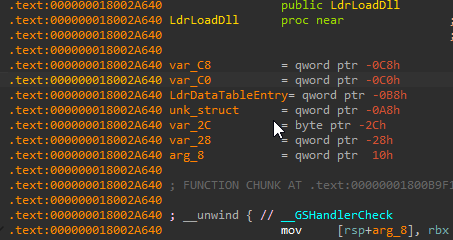
The only thing we need to do is find a call to LdrpLoadDll, which is not hard to locate. After that, we can trace the call to LdrpLoadDllInternal, which is also fairly straightforward. If you really want to understand this process fully, start by reversing LoadLibrary. You'll quickly reach LdrLoadDll. Take the time to understand the parameters and analyze it further. I did this, and it was a really rewarding experience.
The end
Thank you for reading this article! You can find the complete code, along with detailed comments for each line, on my GitHub repository. I encourage you to explore and learn from it.
Please note that while I provide this information for educational purposes, I do not take responsibility for how these functions are used. I urge you to use this knowledge responsibly and ethically, keeping in mind the potential implications of working with undocumented functions in a production environment. Happy coding!