Syscalls Explained: The Gateway to Bypassing User-Mode Hooks (Part 1)
After covering the basics of system calls in the first part, it's time to get practical. In this article, I'll show you how to bypass User-Mode hooks using direct syscalls.
Our Test Setup
First, we'll demonstrate what a normal call to NtAllocateVirtualMemory looks like with one twist: we've placed a Detour Hook on this function beforehand.
After that, we'll call the same function using a direct syscall to bypass the hook.
The following diagram illustrates the current flow with the hook installed:

As you can see, the call to VirtualAlloc (which internally calls NtAllocateVirtualMemory) gets redirected to our hook function HkNtAllocateVirtualMemory. The hook simply prints "Hook called!". It's only there so we can verify whether our direct syscall actually bypasses the hook.
The Hook
NTSTATUS NTAPI HkNtAllocateVirtualMemory(
    HANDLE ProcessHandle,
    PVOID* BaseAddress,
    ULONG_PTR ZeroBits,
    PSIZE_T RegionSize,
    ULONG AllocationType,
    ULONG Protect)
{
    std::cout << "Hook called!\n";

    return reinterpret_cast<tNtAllocateVirtualMemory>(oNtAllocateVirtualMemory)(
        ProcessHandle,
        BaseAddress,
        ZeroBits,
        RegionSize,
        AllocationType,
        Protect
    );
}
Now let's call the function normally:
auto ret = reinterpret_cast<tNtAllocateVirtualMemory>(NtAllocateVirtualMemoryAddr)(
    GetCurrentProcess(),
    &baseAddress,
    0,
    &size,
    MEM_COMMIT | MEM_RESERVE,
    PAGE_READWRITE
);
We should see the following output:
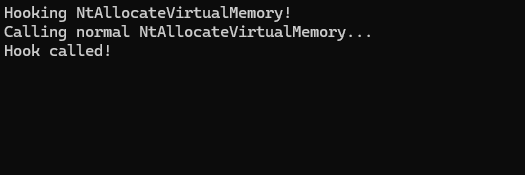
The hook was triggered as expected.
Direct Syscalls
Direct Syscalls do exactly what the name suggests: they invoke the syscall directly by embedding the assembly instruction in our own program. This completely bypasses ntdll.dll.
Assembly Stub
First, we create a simple stub in an .asm file:
.code

MyNtAllocateVirtualMemory PROC
    mov r10, rcx          ; x64 Fast Call Convention
    mov eax, 24           ; Syscall number for NtAllocateVirtualMemory
    syscall
    ret
MyNtAllocateVirtualMemory ENDP

END
Now we can call the stub like a regular function:
ret = MyNtAllocateVirtualMemory(
    NtCurrentProcess(),
    &baseAddress,
    0,
    &size,
    MEM_COMMIT | MEM_RESERVE,
    PAGE_READWRITE
);
And voilà, the hook is not triggered:
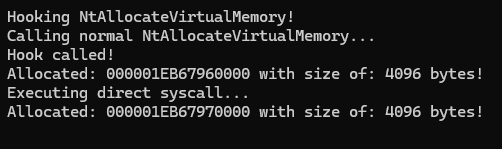
Problems with Direct Syscalls
Direct syscalls are very powerful against User-Mode hooks and many EDR/AV solutions. However, they still have some drawbacks:
1. Return Address on the Stack
With a normal call flow, the call stack looks roughly like this (Calling NtAllocateVirtualMemory directly!):
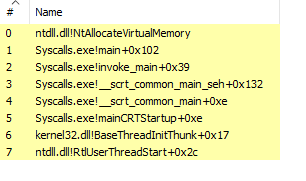
EDR solutions that monitor syscalls often validate the call stack at the time the syscall is executed. They check whether the return address leads back into a legitimate Windows module, specifically ntdll.dll. This is a reasonable heuristic: under normal circumstances, every syscall instruction is executed inside ntdll.
With a direct syscall, the picture changes dramatically:
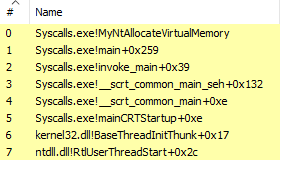
The return address now points directly into your own binary. No ntdll, no legitimate Windows module in sight. Modern EDRs use a technique called call stack unwinding to walk up the stack at syscall time and flag exactly this pattern. Some go further and check whether the memory region containing the return address is backed by a signed PE on disk.. Your custom stub will fail that check immediately.
This is also why simply moving your stub to a manually mapped region doesn't help much on its own: the absence of a proper backing module is just as suspicious as the presence of an unsigned one.
To make direct syscalls less detectable, researchers have developed call stack spoofing techniques, but that's a topic for another post.
2. Syscall Instruction in the Binary
The syscall instruction lives directly in your .exe/.dll. This makes it trivial to statically detect that direct syscalls are being used.
3. Syscall Numbers Change
Syscall numbers are not consistent across Windows versions. Hardcoded values will only work on specific builds.
The End
Thank you for reading this article! In Part 2, we'll tackle the weaknesses covered above — specifically how Indirect Syscalls solve the return address problem by letting the syscall instruction execute from within ntdll.dll itself, making the call stack look legitimate to EDRs. Stay tuned.
As usual, you can find the code on my GitHub.