Syscalls Explained: The Gateway to Bypassing User-Mode Hooks (Part 0)
If you're diving into game hacking, EDR evasion, reverse engineering, or low-level Windows internals, understanding syscalls (system calls) is essential. They form the critical bridge between user-mode applications and the operating system kernel. Mastering syscalls allows you to bypass user-mode hooks on common Windows API functions such as VirtualProtect or NtProtectVirtualMemory.
This introductory article is perfect for beginners with solid C++ and Windows API knowledge. It covers the fundamentals and prepares you for more advanced techniques like direct and indirect syscalls.
What Exactly Is a Syscall?
At its core, a syscall is a controlled transition from user-mode code to the operating system kernel to request privileged operations (e.g., memory management, process control, or I/O).
When you call a high-level API like VirtualProtect, the call eventually reaches NtProtectVirtualMemory in ntdll.dll. This function contains a small syscall stub that:
- Loads the syscall number (ID) into the appropriate register (
eaxon x86,raxon x64). - Executes the
syscallinstruction.
How to Retrieve the Syscall ID
Every Nt/Zw function in ntdll.dll follows the same pattern for its syscall stub.
Here’s a visual example from IDA Pro:
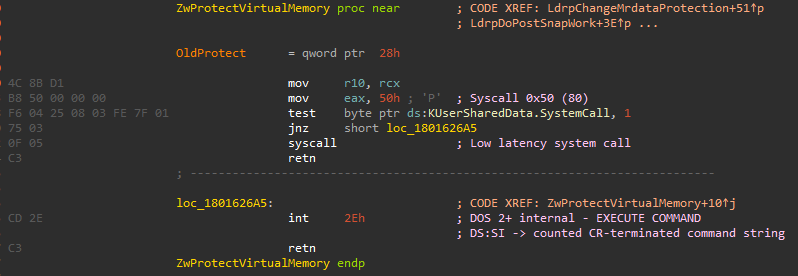
As you can see, the stub in functions like NtProtectVirtualMemory is very compact. This layout is consistent across nearly all Nt/Zw functions in ntdll.dll.
A reliable way to extract the syscall ID is to take the function address and add an offset of +5 bytes. At that point you’ll land directly on the syscall number. I will explain this technique (and alternatives) in more detail in the upcoming parts.
Note: The exact offset can vary slightly between Windows builds, which is why dynamic resolution is preferred over hardcoding.
What Happens During a Syscall?
The following diagram illustrates the full execution flow:

When you call VirtualProtect, it routes through NtProtectVirtualMemory (which only contains the syscall stub). The syscall instruction transitions into kernel mode. There, KiSystemCall64 uses the syscall ID as an index into the System Service Descriptor Table (SSDT) to locate and execute the actual kernel implementation of NtProtectVirtualMemory.
Note: On modern Windows, there are actually multiple System Service Dispatch Tables (SSDTs) for different purposes, but the main one handles most
Nt*functions. The SSDT also functions like a lookup table/array where the syscall number serves as the index.
Challenges and Limitations of Syscalls
Syscall numbers are not stable across Windows versions, making hardcoding them unreliable. High-level Win32 APIs such as VirtualProtect first perform user-mode validation before reaching the underlying native system service. Because of this abstraction, developers are expected to use the documented APIs rather than invoke system calls directly.
The native syscall interface itself is largely undocumented and considered an internal implementation detail by Microsoft. As a result, direct syscall usage is uncommon in legitimate software, but it has become a well-known technique in security research, game hacking, and red-teaming for interacting with Windows at a lower level.
Note: While
Nt*functions are the most commonly used, there are alsoZw*variants which are essentially aliases that can behave slightly differently in certain edge cases (e.g., when called from kernel mode).
Why Should You Care About Syscalls in 2026?
Even though Microsoft continues to improve kernel protections and EDR visibility, direct and indirect syscalls remain one of the most effective ways to bypass user-mode API hooks. Understanding them is fundamental for anyone working on:
- Game hacking / anti-cheat bypasses
- Red team operations
- Malware analysis
- Custom tooling development
Note: Many modern EDR solutions now monitor for suspicious syscall patterns. That's why learning both the offensive and defensive side (as covered later in this series) is crucial.
What This Series Will Cover
- Getting Syscall IDs — Reliable methods to dynamically resolve syscall numbers.
- Direct Syscalls — The simplest and most straightforward way to invoke syscalls.
- Indirect Syscalls — A stealthier technique (more code, but harder to detect).
- Detecting and Monitoring Syscalls — How EDRs and monitoring tools detect syscall usage, and how to bypass or evade these detections.